Building Sajideen: a prayer app that won't let you miss salah
Most prayer apps tell you once and hope. I wanted one that keeps asking, gently, on my wrist, until I have actually prayed.
I have missed prayers for the dumbest reason there is: I was busy.
Not busy with anything that mattered more. Just busy. A standup ran long, a deploy needed watching, a bug was nearly fixed. My phone told me Asr had started, I swiped the notification away with every intention of praying in ten minutes, and the next time I looked up, Maghrib was coming in.
Every prayer app I tried had the same shape. One notification at the start of the time, then silence. Many of them were also packed with ads, which feels wrong in an app whose whole purpose is worship. None of them understood the one thing I needed: a reminder that keeps asking until I answer it.
That matters because salah is not something to fit in whenever the day allows. Each prayer has its own time, and praying it within that time, ideally early, is part of praying it well. Missing it because a meeting overran is not a scheduling problem. It is the thing I least want to get wrong.
So I built an app that keeps asking.
 Sajideen: Never Miss SalahPrayer times that keep reminding you until you have prayed.sajideen.app · Dedicated to my parents.
The idea
Sajideen does one thing differently. When a prayer's time begins, it tells you. If you have not marked the prayer as offered, it checks in again. And again. Shortly before the time runs out, it sends a final red "this prayer is ending" warning. The moment you tap I have prayed, on your phone, your watch or the notification itself, every remaining reminder for that prayer is cancelled.
It lives on the wrist first, because that is where a nudge actually lands when your phone is face down on a desk.
The app is dedicated to my parents. It is free, and it will stay free: no ads, no subscriptions, no account, no data sold. I am not seeking a price for it from anyone. I seek its reward only from Allah, and I hope it becomes something that keeps benefiting people long after I have stopped working on it.
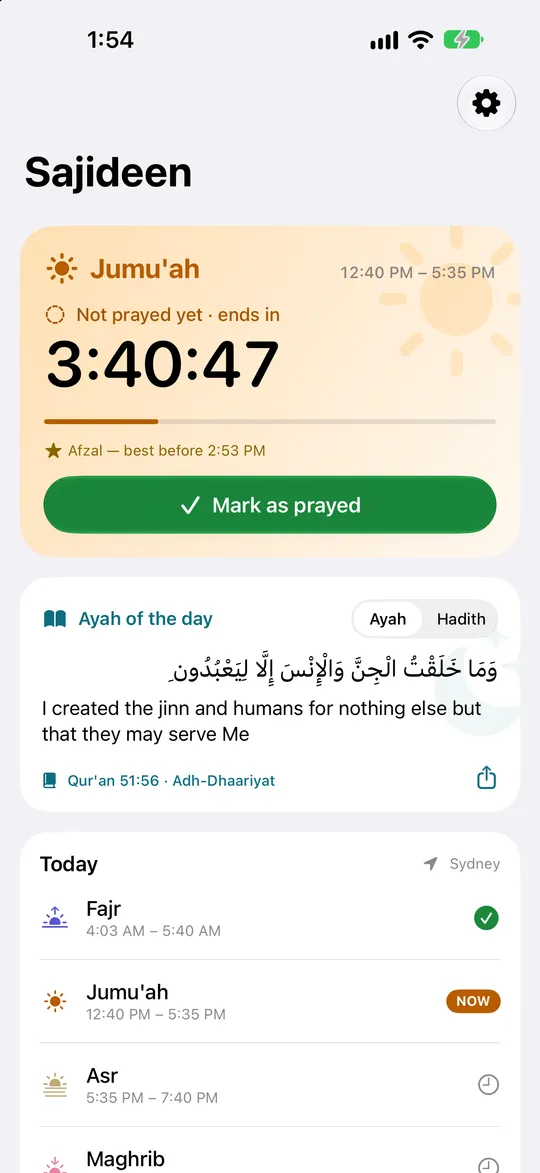
The current prayer, and how long is left
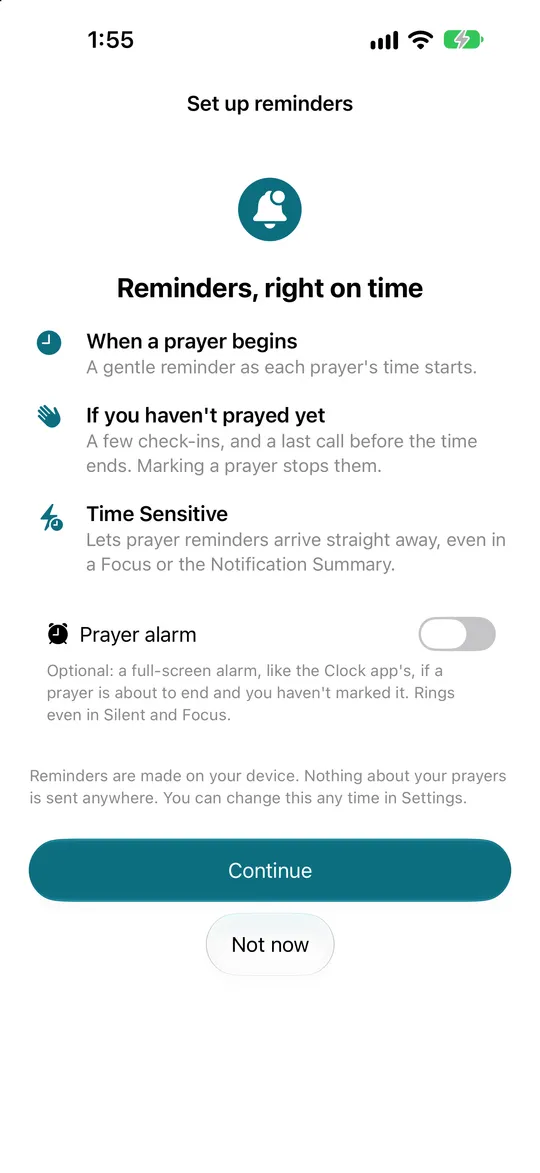
Reminders that keep asking
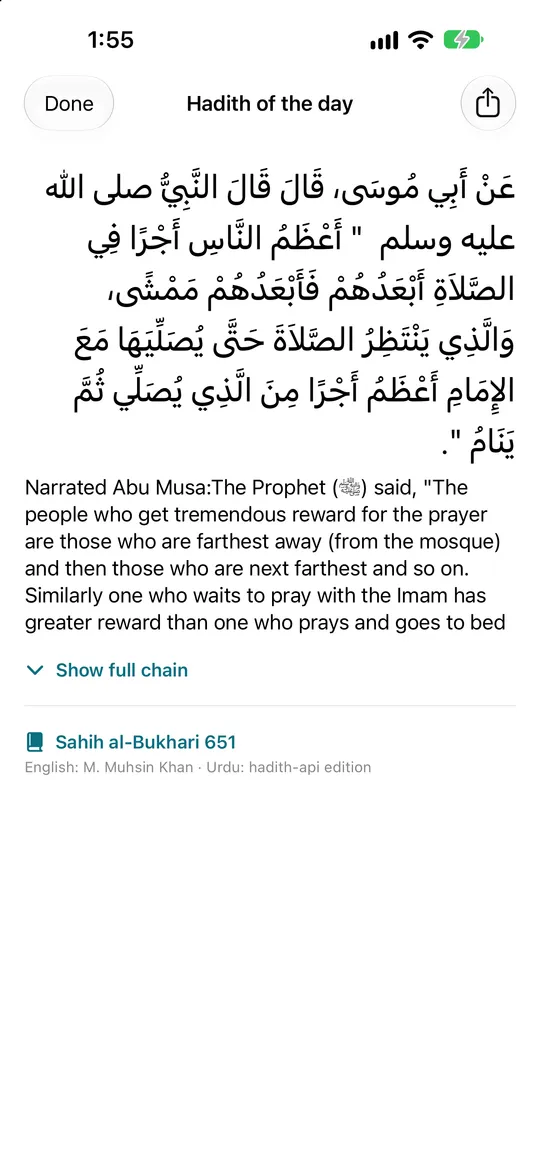
Matn first, full chain one tap away
What "Sajideen" means
السَّاجِدِينَ, sajideen, means "those who prostrate". In Urdu we would say sajda karne wale: the people who bow down before their Lord.
The word comes from the end of Surah al-Hijr, where the Prophet ﷺ is told:
فَسَبِّحْ بِحَمْدِ رَبِّكَ وَكُنْ مِنَ السَّاجِدِينَ
When (you feel so) glorify your Lord with His praise and prostrate yourself before Him
Qur'an 15:98 · Translation: Abul A'la Maududi
There is a reflection of my own behind the name, too. I believe the ones who prostrate are the ones who truly succeed, in this life and in the hereafter. Surah al-Mu'minun opens by tying success to prayer itself:
قَدْ أَفْلَحَ الْمُؤْمِنُونَ
الَّذِينَ هُمْ فِي صَلَاتِهِمْ خَاشِعُونَ
The believers have indeed attained true success, those who, in their Prayers, humble themselves
Qur'an 23:1–2 · Translation: Abul A'la Maududi
That is the whole ambition of the app, in one word: to help a few more of us be among them.
Prayer-time maths, on the device
Prayer times are astronomy. Fajr begins when the sun is a set angle below the horizon before sunrise. Dhuhr is just after solar noon. Asr depends on shadow length. Maghrib is sunset. Isha is another angle below the horizon after dark.
Sajideen calculates all of it on the device, from the location and the date. No API, no server, and it works in airplane mode. The defaults follow what most people around me pray by: the University of Islamic Sciences, Karachi method, with Fajr and Isha at 18° below the horizon, and the Hanafi rule for Asr, where Asr begins when an object's shadow is twice its length.
Then the edge cases arrive, and the edge cases are the job.
High latitudes. In a northern summer the sun may never get 18° below the horizon, so a naive calculation simply returns no Fajr at all, or a twilight that runs all night. Sajideen applies the angle-based rule: Fajr and Isha are limited to a fraction of the night proportional to the angle. It never triggers in Karachi. It matters a lot in Manchester in June.
The prayer day runs Fajr to Fajr. Isha can validly be prayed well after midnight. If the app's day ended at 12:00 am, a late Isha would be logged against the wrong date and your log would quietly lie to you. So Sajideen's day starts at Fajr and ends at the next Fajr. It sounds small. It touched the log, the widgets, the watch sync and every streak calculation.
Jumu'ah. On Fridays, Jumu'ah replaces Dhuhr. It is prayed at the masjid at a fixed time, so a chain of "have you prayed?" nudges is the wrong behaviour. It gets one afternoon check-in instead.
Makruh windows. There are times when voluntary prayer is disliked: around sunrise, at the sun's zenith, and as the sun sets. The app shows them so you know when not to start a nafl prayer, which is the kind of thing almost no prayer app bothers with.
The reminder engine
This was the part I was most excited about, and the part iOS fought hardest.
Every prayer has its own escalation rules. Fajr is short, so it checks in early and often. Isha runs until dawn, so it spaces its check-ins out and caps them at three, because nobody wants a nudge every ten minutes at 2 am.
case .fajr:    ReminderRules(firstCheckIn: 20, interval: 10, criticalBefore: 15)
case .asr:     ReminderRules(firstCheckIn: 45, interval: 15, criticalBefore: 15)
case .maghrib: ReminderRules(firstCheckIn: 15, interval: 10, criticalBefore: 10)
case .isha:    ReminderRules(firstCheckIn: 60, interval: 90, criticalBefore: 30, maxCheckIns: 3)
Try it. Pick a prayer, then mark it as prayed and watch the rest of the chain disappear:
One prayer window, one reminder chain
Fajr · 5:35 am to 6:55 am
7 of 7 alerts scheduled- 5:35 amStartFajr time has begun
- 5:55 amCheck-inHave you prayed?
- 6:05 amCheck-inStill pending
- 6:15 amCheck-inStill pending
- 6:25 amCheck-inStill pending
- 6:35 amCheck-inStill pending
- 6:40 amEndingFajr is ending · 15 min left until sunrise
Sample times for Karachi in November. Isha runs until Fajr, so its check-ins are spaced out and capped at three.
iOS gives each app 64 pending local notifications. Total. Five prayers a day, each with a start alert, several check-ins and a final warning, runs out quickly. So the scheduler builds the chain for the coming prayers in order and stops at 60, leaving headroom for one-off alerts like the Ramadan sehri reminder. Every time the app or a widget wakes up, the window slides forward and refills.
Everything is marked time-sensitive, so reminders break through Focus modes and the Notification Summary instead of arriving in a bundle three hours later. The final "ending" alert carries the highest relevance and the adhan sound, and it is styled as the red, critical step in the chain.
When you mark a prayer, the app removes that prayer's pending requests by identifier, and also clears any that are already sitting in Notification Centre. That second step is easy to forget, and without it you mark Asr and still have three stale "have you prayed?" banners staring at you.
Android has the opposite problem: there is no 64 limit, but the system works hard to delay anything that is not urgent. Sajideen uses exact alarms (setExactAndAllowWhileIdle) so a reminder fires at the minute it should, even in Doze. The final warning can open as a full-screen alarm, like an incoming call, if you grant that permission.
On iOS, Apple's new AlarmKit made the same thing possible for the first time. It is opt-in, under the name Prayer alarm: a full-screen alarm, like the Clock app's, if a prayer is about to end and you have not marked it. It rings even in Silent mode and Focus. I made it opt-in on purpose. It is powerful, and powerful is something a person should choose.
Apple Watch first
I designed for the watch before the phone. On the wrist, "Mark as prayed" is one tap, and a check-in is a tap on your arm rather than a sound you might not hear.
The phone and the watch keep separate copies of the prayer log, synced directly over WatchConnectivity. No server sits between them. The tricky part is deletion. If you mark Dhuhr by mistake and undo it on your watch while it is away from your phone, a simple "union of both logs" merge would bring the mark straight back the next time they meet.
So an un-mark is not a deletion. It is a timestamped tombstone:
// Simplified. Newest write wins: an undo beats an older mark, a mark beats an older undo.
for (key, removedAt) in incoming.tombstones where removedAt > (marks[key] ?? .distantPast) {
    marks[key] = nil
    tombstones[key] = removedAt
}
Both devices converge on the same answer no matter which one changed last or how long they were apart.
Around that sit the pieces that make it feel native: complications for the watch face showing the current prayer and time left, a Live Activity on the iPhone Lock Screen and Dynamic Island counting down to the end of the current prayer, WidgetKit widgets, and the adhan played on the watch itself when a prayer begins.
Native on Android too
I could have shipped the Android version as a cross-platform port. I did not. The reminder engine depends on platform scheduling, wearables and system surfaces, and every one of those behaves differently. Sajideen for Android is fully native: Kotlin, Jetpack Compose and Material 3.
The Wear OS app has its own Tile and complications, and the phone and watch sync over the Wearable Data Layer, using the same tombstone rules as the Apple version. A home-screen widget is built with Glance. The prayer maths and the reminder rules are ported to match the Swift implementation number for number, so a Fajr time in Karachi is the same on every device.
Built for the wrist, born at Hajj
The reminders are the heart of Sajideen. The tools around them started somewhere else.
In 2026, Allah gave me the chance to go for Hajj.
During Tawaf, in the crowd, I kept losing count of my rounds. Each round starts at the green light, the green line opposite the corner of the Black Stone, and every time you reach it you have to remember which round you are on. With so many people around you and your heart where it should be, that is harder than it sounds. The only help I had was a manual tasbih.
I looked for a good Apple Watch app that could count Tawaf rounds on my wrist, and I could not find one. Nor one for Sa'i between Safa and Marwah. Nor a Qibla finder that actually guides you, instead of showing a needle and leaving you to work it out. So I built them.
Those tools are now part of Sajideen, and they are the ones I care about most after the reminders. The counters and the Qibla finder all work on the watch, so your phone can stay in your pocket and your hands stay free.
Tasbih counter. Tap anywhere to count. Pick SubhanAllah, Alhamdulillah, Allahu Akbar and more, with targets of 33, 34, 100 or your own number, an undo for a mistaken tap, and a running total for the day.
Tawaf counter. This is the one I needed in the crowd. You tap once each time you reach the green light, and the watch tells you which round you are on, from the Black Stone around to the Black Stone, until all seven are done. Next to it is a short guide to what is authentically reported during Tawaf, and an honest note that there is no authentic du'a fixed for each round.
Sa'i counter. Seven laps between Safa and Marwah. Safa to Marwah is one lap, Marwah back to Safa is the next, and it ends at Marwah. The screen always shows the lap you are on and which way you are walking.
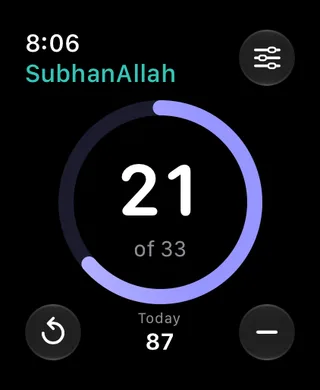
Tasbih on the wrist
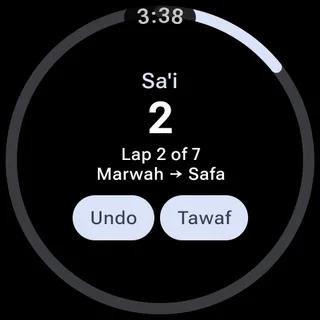
Sa'i on Wear OS, Tawaf one tap away
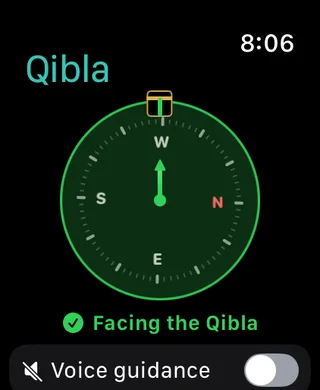
Qibla on the watch, with voice guidance
Qibla finder with voice guidance. A compass is only useful if you can read it. Turn on voice guidance and Sajideen tells you what to do: turn left, turn right, a little left, until it says you are facing the Qibla. It speaks only when the instruction changes, and a light tick follows you as you turn. With VoiceOver running, the cue becomes an announcement so the two voices never talk over each other.
Yearly prayer calendar. Every prayer time for the whole year, a month at a time, with today highlighted and a share button.
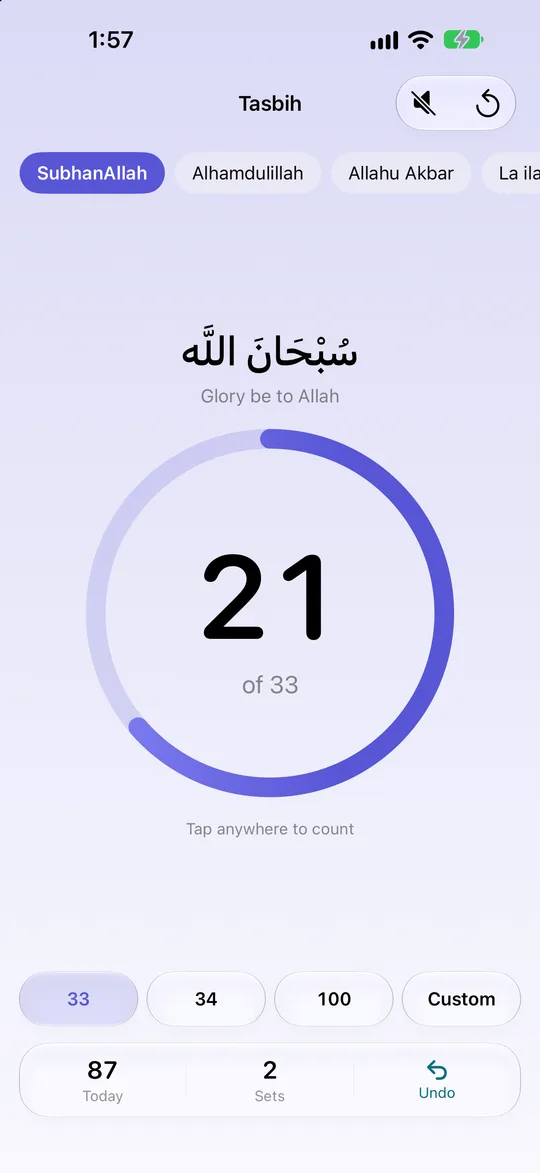
Tasbih: tap anywhere to count
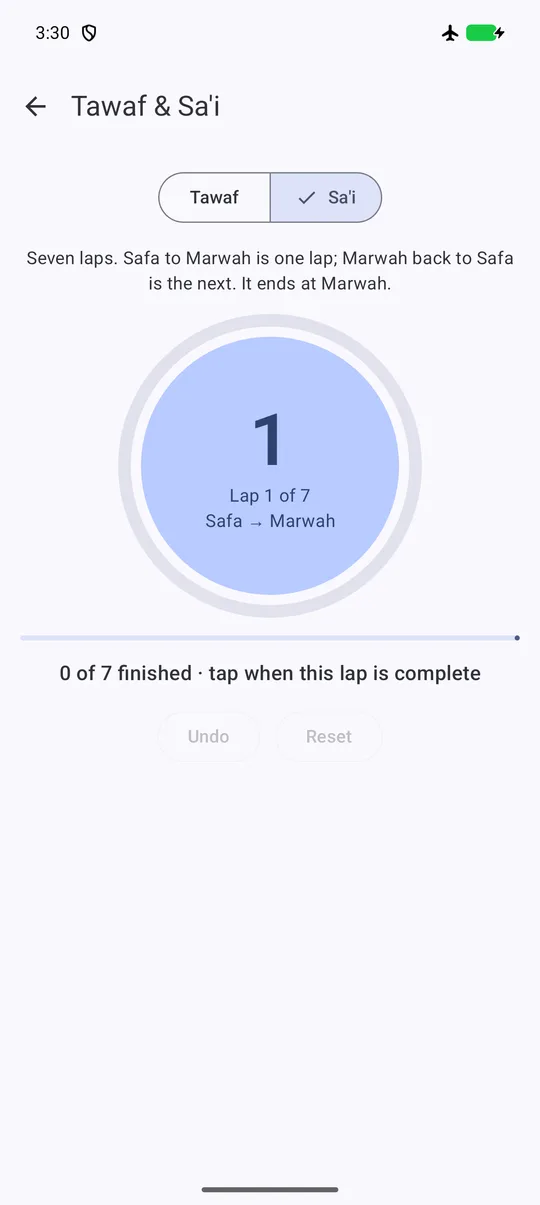
Tawaf and Sa'i, round by round
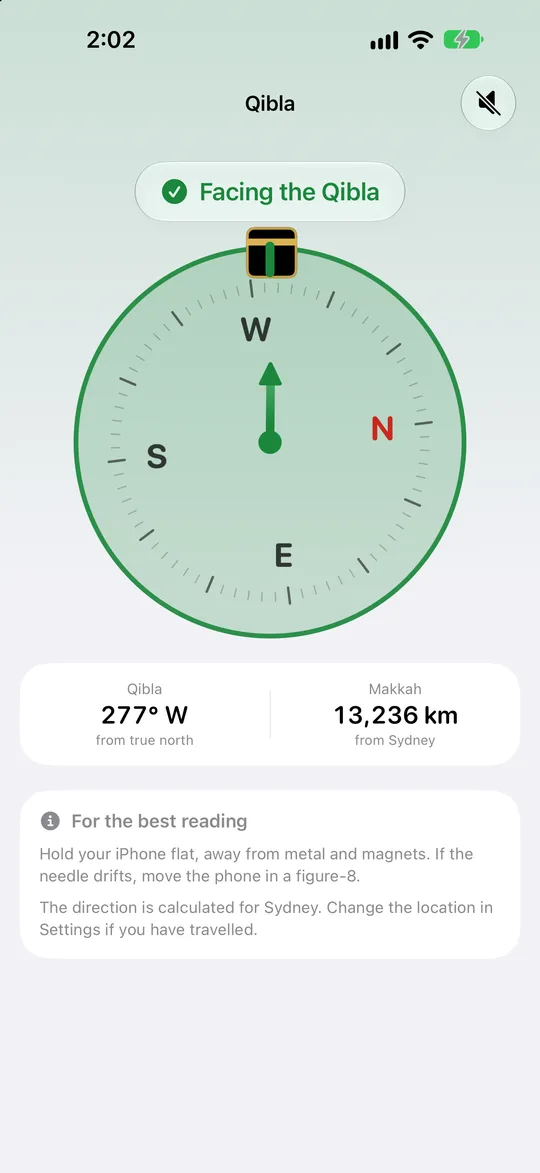
Qibla, with a clear Facing the Qibla state
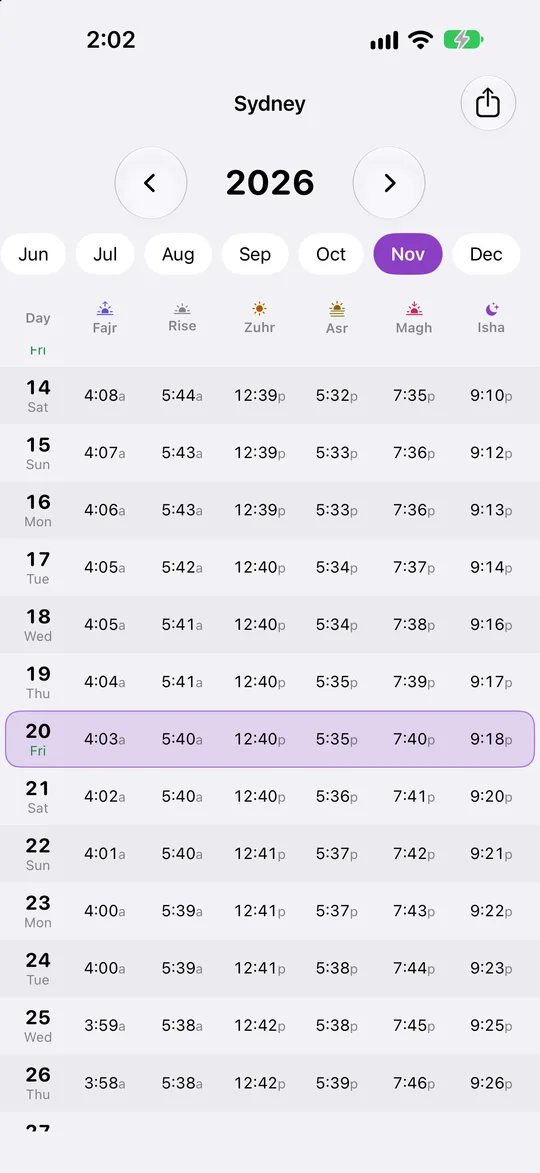
A whole year of prayer times
Everything else, in one list:
- Escalating reminders that keep asking until you mark the prayer, with an opt-in full-screen prayer alarm
- Adhan on the watch, complications, widgets and a Live Activity
- A prayer log that syncs between your phone and watch, with no account
- Tasbih and rakat counters
- Tawaf and Sa'i counters, with authentic du'as
- Qibla finder with voice guidance
- Yearly prayer calendar
- Ramadan sehri and iftar times, and moon-sighting dates per country
- An ayah and a hadith every day, from the Qur'an, Sahih al-Bukhari and Sahih Muslim
- Makruh times, Jumu'ah handling and high-latitude rules
- English and Urdu
Sourcing religious text responsibly
This is the part I care about most, and the part I was most careful with.
Sajideen shows an ayah and a hadith every day, along with texts inside tools like the Tawaf and Sa'i guides. The rules I set were strict:
- Qur'an, and hadith from Sahih al-Bukhari and Sahih Muslim only. No other collection is used anywhere in the app, and nothing weak is shown.
- Every text is pulled verbatim from open datasets by a script. The Arabic Qur'an comes from the Tanzil "Simple" text. Hadith come from open public-domain editions. Not a single religious string in the app was typed from memory or written by a model.
- The English Qur'an is Abul A'la Maududi's translation. The Urdu is set in Nastaliq, right to left, as it should be read.
One design choice took real thought: the isnad, the chain of narrators. A hadith in Arabic usually opens with "so-and-so told us, from so-and-so, from so-and-so…" before you reach what the Prophet ﷺ actually said. That chain is the backbone of hadith scholarship, but on a watch-sized screen it buries the message. So the build script cuts the start of the text at the Companion who narrated it, shows the matn from there, and keeps the full chain one tap away behind Show full chain. Nothing is reworded. The shown text is always a verbatim tail of the original. Where a chain cannot be split reliably, the hadith is shown whole.
Then there is the moon. Moon-sighting authorities differ by country. Pakistan's Ruet-e-Hilal Committee and Saudi Arabia's Umm al-Qura calendar regularly put Ramadan or Eid on different days. An app that hard-codes one answer is wrong for millions of people.
Sajideen ships a calculated expected date for each authority, plus a small remote feed. When an authority announces its sighting, the feed is updated and the date in the app flips from Expected to Confirmed. No app update, no guesswork, and the user can see exactly which one they are looking at.
Privacy-first analytics
Sajideen has no accounts and no login. Ever.
A login would let me sync your prayer log to a server. It would also mean I hold a record of when you pray, tied to your email. I do not want that data, and you should not have to trust me with it. Your log stays on your own devices and syncs directly between them.
I still need to know whether the app works, so it uses PostHog with anonymous IDs only. It never identifies a user and never sends names, emails, coordinates or feedback text. A handful of events, like "a prayer was marked, on time or not" and "the Qibla screen was opened", tell me which features matter, and nothing more.
Remote config without a code push
Web developers ship a fix and everyone has it in seconds. React Native teams can push JavaScript over the air. Native apps cannot: Apple and Google require new code to go through review, and that is the trade-off for being truly native.
What I can change remotely is configuration. A small public Firestore document holds the minimum supported version and the latest version for each platform. If a build ever ships with a bug that gets prayer times wrong, the app can show a blocking "Update required" screen to everyone below the minimum version. A softer "update available" card covers everything else. It is a seatbelt I hope I never need, and for an app people rely on for worship, it is not optional.
How it was built
Sajideen covers an iPhone app, a watchOS app, widgets, a Live Activity, an Android app, a Wear OS app, a website and a content pipeline, and I built it as one developer. I took an AI-first approach: I worked with several AI coding agents in parallel, each on its own lane, and spent my time directing them, reviewing what came back, and testing on real devices against published timetables.
The agents were tools. The decisions that matter in an app like this stayed with me: which prayer method to default to, which hadith collections are trustworthy enough, how to treat the isnad, whether a full-screen alarm should be opt-in. And one rule never bent: no model ever wrote religious text. Agents wrote the scripts that pull text from the datasets, never the text itself.
Launch
Both apps are submitted: Sajideen for iPhone and Apple Watch on the App Store, and for Android and Wear OS on Google Play. They are in review right now, so if a store page says the app is not available yet, please check back in a day or two. Everything else lives at sajideen.app, including the support page and privacy policy.
If you try it, I would love to hear what works and what does not. If it helps you pray on time even once, it has done its job. And if it benefits you, please remember my parents and my family in your du'a.
رَبَّنَا تَقَبَّلْ مِنَّا ۖ إِنَّكَ أَنْتَ السَّمِيعُ الْعَلِيمُ
Lord, accept this service from us; You are All-Hearing and All-Knowing
Qur'an 2:127 · Translation: Abul A'la Maududi
I build mobile and web products, and Sajideen is my own. If you are building something for the wrist, I am happy to compare notes.